What is WebRTC Client?
WebRTC Client is a browser-based softphone with a multi-tenant management portal. It registers to your existing PBX over a secure websocket, so users can make and receive calls in Chrome, Edge, Firefox or Safari without installing software.
Is WebRTC Client available today?
The new version of WebRTC Client — with multiple lines, live AI transcription, queues and voicebots — is available in early access and still in active development, with more on the roadmap. Contact us for early access or to discuss partner and service-provider licences.
Which phone systems are supported?
Asterisk, FreePBX, VitalPBX, MirtaPBX, Issabel, Kamailio, FreeSWITCH and most other SIP platforms with a secure websocket. See compatibility.
What do I need on my PBX?
A valid TLS certificate (not self-signed), a websocket over TLS (usually TCP port 8089) and extensions with WebRTC enabled (AVPF, ICE, rtcp-mux, DTLS-SRTP). The integration guides explain each step.
What do users need?
A modern browser, a microphone and speakers or a headset, and an internet connection that can reach the PBX websocket. On first use, the browser asks permission to use the microphone.
Do users need to know their SIP credentials?
No. Administrators map extensions to e-mail addresses in the management portal. Users sign in with e-mail and password; SIP passwords stay hidden. With MirtaPBX, credentials can even be retrieved via the API.
Is it secure?
Signalling runs over a TLS-encrypted websocket (WSS) and media is encrypted with DTLS-SRTP. The platform has been penetration-tested by an external security company.
My PBX is behind NAT and I have no audio. What should I do?
Enable ICE support and configure a STUN server, and add ICE host candidates that map your private IP to your public IP. See STUN servers and the NAT sections of the Asterisk and FreePBX guides.
Can office users and remote workers use the same address?
Yes. Use a public hostname for remote users and an internal DNS record for office users that points to the PBX's private IP. See internal PBX with remote clients.
Browser notifications or pop-ups are not showing on Windows. How do I fix this?
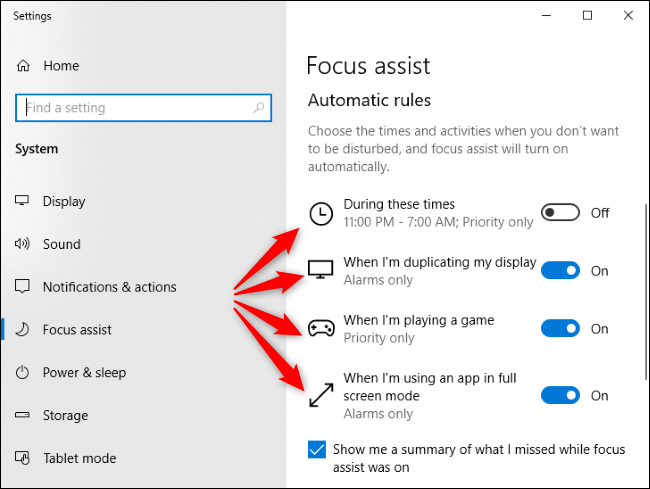
Check Windows Focus assist (called Do not disturb on Windows 11). When it is on, Windows hides browser notifications. Switch it off or add your browser as an allowed app.
Can I use my own brand?
Yes. WebRTC Client is fully white-label: logo, colours, domain and notification e-mails.
Does WebRTC Client transcribe calls?
Yes. The new version offers optional live AI transcription, switchable per call and controlled per tenant with policies. Live call translation is available in beta: the translation appears next to the transcript, for both sides of the call. AI call summaries and searchable conversations are on the roadmap.
Can I handle more than one call at a time?
Yes. WebRTC Client supports multiple lines: call waiting, switching between calls and per-call controls.
Is there a free trial?
Yes, a free 30-day trial is available through early access. See free trial.