Issabel PBX supports websockets and WebRTC. In a few steps you can connect WebRTC Client to Issabel.
Requirements
- Asterisk 11 or later
- A valid TLS certificate
- TCP port
8089open and forwarded to your Issabel server
Step 1 — Enable HTTPS for Issabel
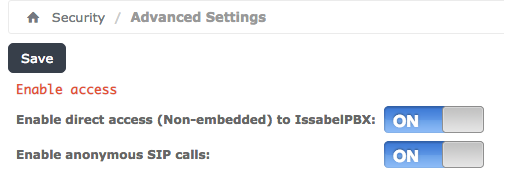
Open Security → Advanced Settings, set Enable direct access to On and click Save.
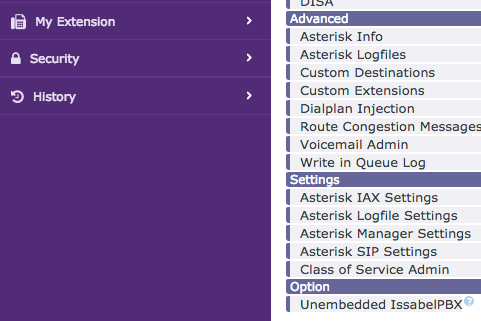
Then open PBX → PBX Configuration → Option → Unembedded IssabelPBX.
Under Advanced Settings, select your certificate and set the HTTPS options as shown below.
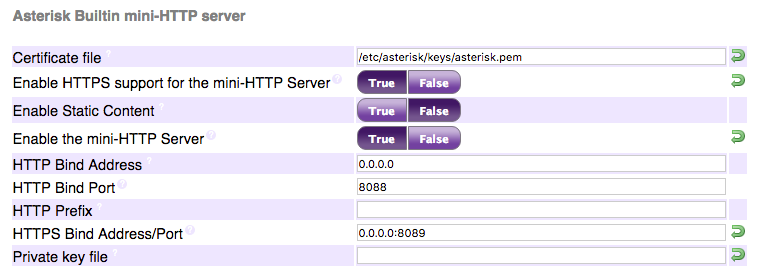
HTTPS options missing?
If you don't see the HTTPS options, add them to the database manually. Adjust the values where needed — at your own responsibility:
mysql -u root -p asterisk -e "INSERT INTO issabelpbx_settings VALUES \
('HTTPSBINDADDRESS','0.0.0.0:8089','HTTPS Bind Address/Port',2,'Address and port to bind to for HTTPS. Default is 127.0.0.1:8089','text','','127.0.0.1:8089',0,0,'Asterisk Builtin mini-HTTP server','',0,0), \
('HTTPSCERTFILE','/etc/asterisk/keys/cert.pem','Certificate file',2,'Full path to certificate file for HTTPS.','text','','/var/lib/asterisk/keys/localhost.crt',0,0,'Asterisk Builtin mini-HTTP server','',0,0), \
('HTTPSENABLED','1','Enable HTTPS support for the mini-HTTP Server',1,'Whether to enable HTTPS support for the Asterisk HTTP interface. Default is no.','bool','','0',0,0,'Asterisk Builtin mini-HTTP server','',0,0), \
('HTTPSPRIVATEKEY','/etc/asterisk/keys/priv.pem','Private key file',2,'Full path to private key file for HTTPS. If empty, default is to look into certificate file for private key.','text','','/var/lib/asterisk/keys/localhost.key',0,0,'Asterisk Builtin mini-HTTP server','',1,0);"
Step 2 — Configure an extension with WebRTC support
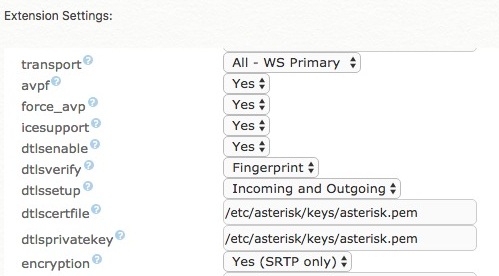
Use dedicated extensions for WebRTC. Open PBX → PBX Configuration → Extensions, select the extension and make sure the WebRTC values (transport, AVPF, ICE support, encryption) are set as shown:
Step 3 — Behind NAT?
If your PBX is behind NAT, enable ICE and set a STUN server. Edit /etc/asterisk/rtp_custom.conf:
icesupport=true
stunaddr=stun.stunprotocol.org:3478
Step 4 — Map the extensions
Log in to the management portal, enter the WebRTC (websocket) settings and map the extensions to users. See the quick start.